HTML Academy
Previous task
HTML document structure1/19
Back to the list of tasks
  • 1. The HTML doctype, or document type declaration
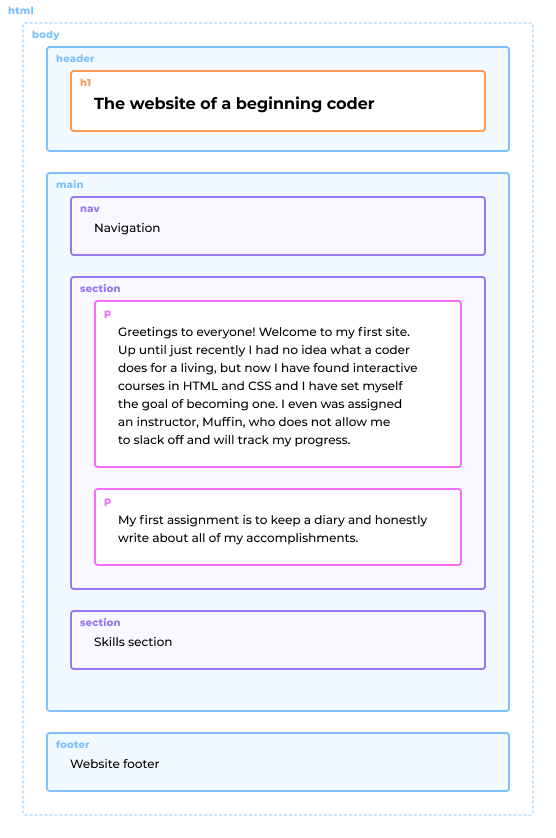
  • 2. Basic HTML tags
  • 3. The head tag, which provides metadata information about the page
  • 4. The title tag for page titles
  • 5. The main tag for main content
  • 6. The header and footer tags
  • 7. The section tag, which is used for semantic sections
  • 8. The nav tag, which is used to specify the main navigation
  • 9. The article tag, which is used to indicate an independent section
  • 10. The aside tag, which is used to specify additional content
  • 11. The h1-h6 and title tags in HTML
  • 12. The p tag for paragraphs
  • 13. Let’s finish marking up our pages
  • 14. The meta tag, which is used for page character encoding
  • 15. The meta tag, which is used for keywords
  • 16. Let’s try a different page layout
  • 17. Summary of “HTML document structure”
  • 18. First challenge
  • 19. First mastery challenge
Basic HTML tags
  • Sign up
  • Log in

Loading…
Everything will be ready in few seconds

  • Theory
  • Theory
  • Comments

The HTML doctype, or document type declaration

Illustration of the final result for the chapter

In the last chapter, we saw how HTML and CSS work, and at the same time we earned the confidence of the instructor, Muffin. So the boss has given us an important task: designing a website for a beginner coder. This website will serve as a learning diary, and Muffin will track your progress.

Your task for this chapter is to develop templates for the main and internal pages of the website. You will learn more about how to lay out HTML pages and the tags that are used to create the important structural blocks on these pages. By the end of the chapter, your pages will look similar to the illustration on the right.

Let’s get started!

An HTML document begins with a document type declaration, or doctype. The modern HTML doctype tells the browser to use standards mode.

The doctype looked like the following in the old version of HTML:

<!DOCTYPE HTML PUBLIC "-//W3C//DTD HTML 4.01//EN"
  "http://www.w3.org/TR/html4/strict.dtd">

It is much simpler in the current version of HTML:

<!DOCTYPE html>

Let’s practice adding the correct doctype to the document.

Comments

  • index.html
  • style.css
HTML
<!-- Add the doctype here --> <html> <head> <link rel="stylesheet" href="style.css"> </head> <body> </body> </html>
CSS
body { background-color: #ffffff; background-image: url("htmlacademy.svg"); background-position: center top; }

What didn’t you like in this task?

Thanks! We’ll fix everything at once!

The code has changed, click “Refresh” or turn autorun on.

You’ve gone to a different page

Click inside the mini-browser to shift the focus onto this window.

100%
Goalscompleted
0

    Add a document type declaration to the page. To do this, perform the following steps:

    1. Insert the line of code <!DOCTYPE html> at the very beginning of the document.

    Cookies ∙ Privacy ∙ License Agreement ∙ About ∙ Contacts ∙ © HTML Academy OÜ, 2019−2026

    VISAMastercard

    Log in

    or

    Forgot your password?

    Sign up

    Sign up

    or
    Log in

    Restore access

    Have you forgotten your password or lost access to your profile? Enter your email connected to your profile and we will send you a link to restore access.

    Forgot to connect your email to the profile? Email us and we’ll help.